

What credits are
Credits pay for the work Aibuku does for you: answering questions in AI assistants, website checks, app checks, search refreshes and setup. Your plan gives you a set number of credits each month, and the trial gives a set number for setup and a first check. A plan’s credits renew each month, and unused ones don’t carry over. Credits you buy in a pack last 12 months and are used after your plan’s credits. You need an active plan to use them. See Plans and trial.What you see
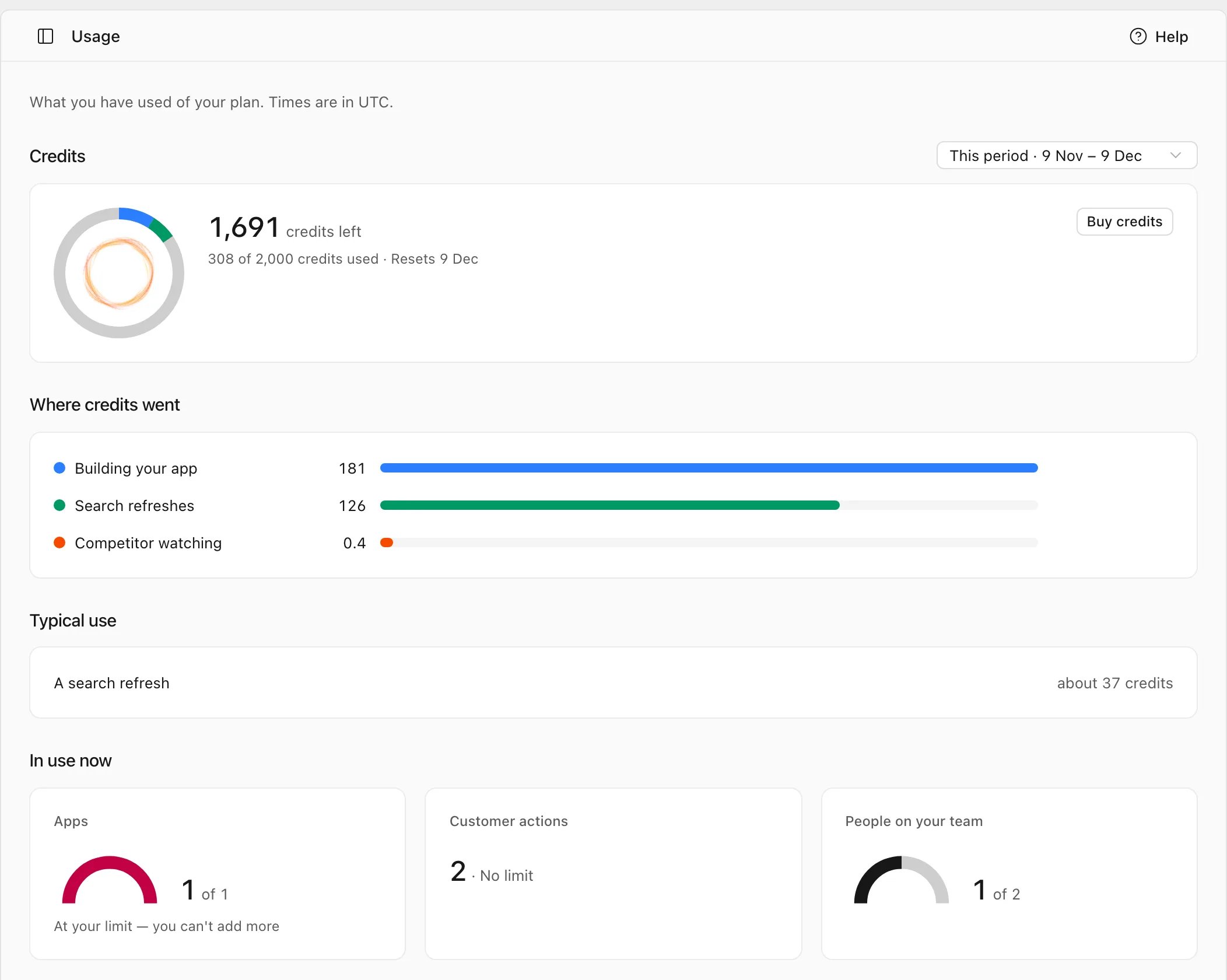
Credits
Beside the ring is how many credits you have left, for example 10,500 credits left. It counts every credit you can still use: your plan’s or trial’s, credits from packs and any credits Aibuku added. Credits from a pack count as soon as the payment is confirmed. The lines under the figure say:- what this period used of your plan’s credits and when they renew, for example 1,480 of 2,000 credits used · Resets 1 Nov. In a trial this reads 120 of 600 trial credits used · Trial ends 8 Nov. The ring around the Aibuku orb shows this part: it fills as you use your plan’s or trial’s credits, and its colours match the activities under Where credits went;
- credits from packs and when they expire, for example +1,000 pack credits · expire 12 Sep 2027, and any credits Aibuku added for you, with the day they expire, for example +200 credits added by Aibuku · expire 30 Nov;
- credits set aside for work that is still running, for example Includes 120 credits for work in progress. When the work finishes, only what it actually used is counted, and the rest comes back. If a search we buy for you fails or never answers, you are not charged for it;
- after the first few days of a period, how long your credits last at this pace, for example At this pace, credits last until about 26 Oct.
- When the credits you have left, packs included, are down to a quarter of your plan’s credits for the period, it says Nearly used. Without packs, that is from 75% of your plan’s credits.
- When your plan’s credits are used and more pack credits are left than that, it says Plan credits used — now using pack credits, or in a trial Trial credits used — now using pack credits.
- Once your business is live, the last part of your credits is kept for your customers’ questions. When only that part is left, it says Scheduled work paused — the last 20% is kept for your customers’ questions. Work you start yourself still runs. (The card says how much your plan keeps back.) Work that runs on a schedule stops until your credits renew or you add credits: the daily run and scheduled search refreshes. Questions from your customers’ AI assistants and anything you start yourself still run. Until your business is live, nothing is kept back, and scheduled work can use all your credits.
- When your credits are used up, it says Used up — everything paused until the day they renew or until you add credits., and that your customers’ assistants say this business is temporarily unavailable. Everything that uses credits stops, including answers to your customers. Your customers’ assistants read: “This business is temporarily unavailable here. Please try again later.” Your business, its services and its settings are kept. Answers start again within a minute of your credits coming back.
Where credits went
Each activity that used credits this period, the largest first, with its credits and a bar: Evaluations, Search refreshes, Website audit, Questions in AI assistants, Try it, Building your app, Making new looks, Pictures, Social posts, Setup and Competitor watching. Competitor watching covers reading competitor news and pages and explaining what they mean for your business. Evaluations also covers talking to an imagined customer on their page (see Talk to a person). Making new looks covers new looks Buku designed for you before New looks became free; new looks use no credits now. Pictures covers pictures added or created for your cards. Searching for photos and adding one from the photo search use no credits. Creating a picture uses credits: the amount shows before you create it, and what you used shows here under Pictures. Social posts covers the posts Buku writes for your social pages: their words, their pictures, and each change you ask for. With more than five, the smallest are grouped under Other. Choose By project beside an activity to see which project used them. An agency workspace shows By client. Credits used before a project existed, mostly during setup, are listed as Not tied to a project. A project you deleted is listed as Removed project. A period with nothing used says No credits used in this period.Typical use
About how many credits one task uses in your workspace, measured from what you ran in the last 30 days: An evaluation run, A search refresh, A customer question and A social post (its words and its pictures). A task is listed once it has happened at least five times. Earlier periods do not show this.In use now
What your workspace has right now, out of what your plan allows: Apps, Customer actions and People on your team. The People on your team tile counts everyone who can open something in your workspace once: the people in it, people you invited to a project only, and invitations still waiting for an answer. These are not paid for with credits. During the trial, People on your team shows No limit: invite everyone who will use Aibuku. From 75% a tile says Nearly used. At the limit it says At your limit — you can’t add more: what you already have keeps working, but you can’t add another. If someone on a project who doesn’t manage billing adds a customer action then, they read This workspace has no room for another customer action. Ask the workspace owner to make room, then add it again. and get no link to Billing. The same goes for a new app: they read This workspace has no room for another app. Ask the workspace owner to make room, then add it again., with no link to Billing. Their message is titled No room left. Someone who manages billing sees Review your plan there, with the links to Billing. Moving a project into the workspace counts too: if its apps, customer actions or people would take you past a limit, the project isn’t moved. If you have more than your plan allows (for example after moving to a smaller plan), the tile first says by how much, such as 2 over your plan.Shares per project
Under In use now, owners and admins see Shares per project (Shares per client in an agency workspace): what each project uses of the apps, customer actions, people and credits you kept for it. See Split your plan across projects. While your credit packs have credits to add, each row also has Add credits, which moves some of them to that one project; see Add credits to a project.When you run low
Aibuku tells you in three places.- On the Usage page, the card says Nearly used, that scheduled work is paused, or that your credits are used up (see Credits).
- By email, once a period at each point: Your credits are nearly used at 80% of the period’s credits, Scheduled work is paused when only the credits kept back are left, and Your credits are used up at zero.
- Where work is refused. When something you start needs credits you don’t have, a note at the top of the page (or in the chat) says You’ve used your credits. When scheduled work was stopped to keep credits back, it says Scheduled work is paused. Each says what is paused. Choose View upgrade options to see bigger plans, or Manage billing to open Billing. Someone who doesn’t manage billing reads Ask a workspace owner or admin about more credits. instead of those buttons.
Common tasks
After you pay for a pack, a line under the card says whether your credits were added, for example Payment confirmed. 1,000 credits added, usable until 15 Oct 2027. Credit packs are listed on your invoices.
Only people who manage billing can open this page. Anyone else sees “Only people who manage billing can see the plan.” Ask a workspace owner to give you the Billing role.