

A company’s page is part of Competitors, which is part of Visibility. Every company AI recommends in your answers has one, not only the competitors you track.
How to get there
To look a company up, open Competitors → Companies and search or filter the list; see Companies. Or click a company’s name. Anywhere in the console, a company’s name is a link to its page: on Competitors, on Search presence, on Outside presence, in To do, in the Growth plan, on Buku’s cards and in a test run’s chat. Where the name sits inside a sentence, it has a light underline so you can tell it is a link. Where the name sits inside a row, a button or a chart that does something else when you click it, a click does that. Rest the pointer on the name instead: its card opens, and Open company page at the bottom of the card opens the page. Some rows, such as those in What to do next, also show See its page once you open them. Rest the pointer on a name for a moment, or move to it with the keyboard, and a small card opens beside it. It shows the company’s logo, its name and website, what it sells, and one number: in how many of the last 30 days’ answers AI recommended it, with your own number beside it under You. A competitor you track is marked Competitor, and one you took off your list is marked No longer tracked. Click the name to open the whole page.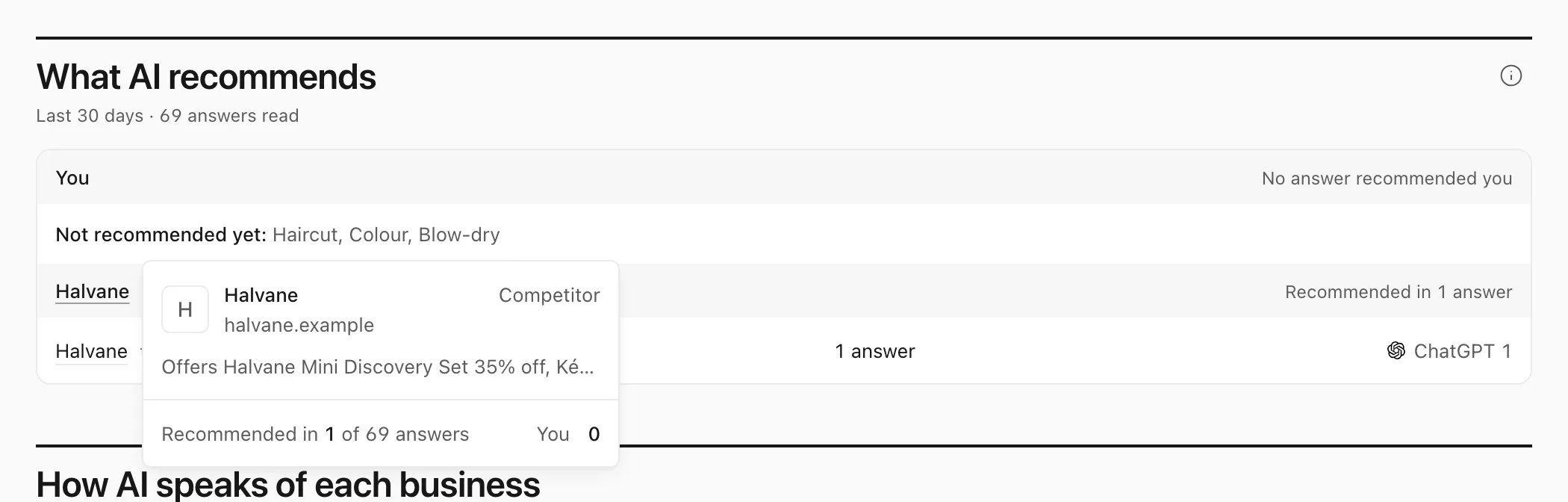
The top of the page
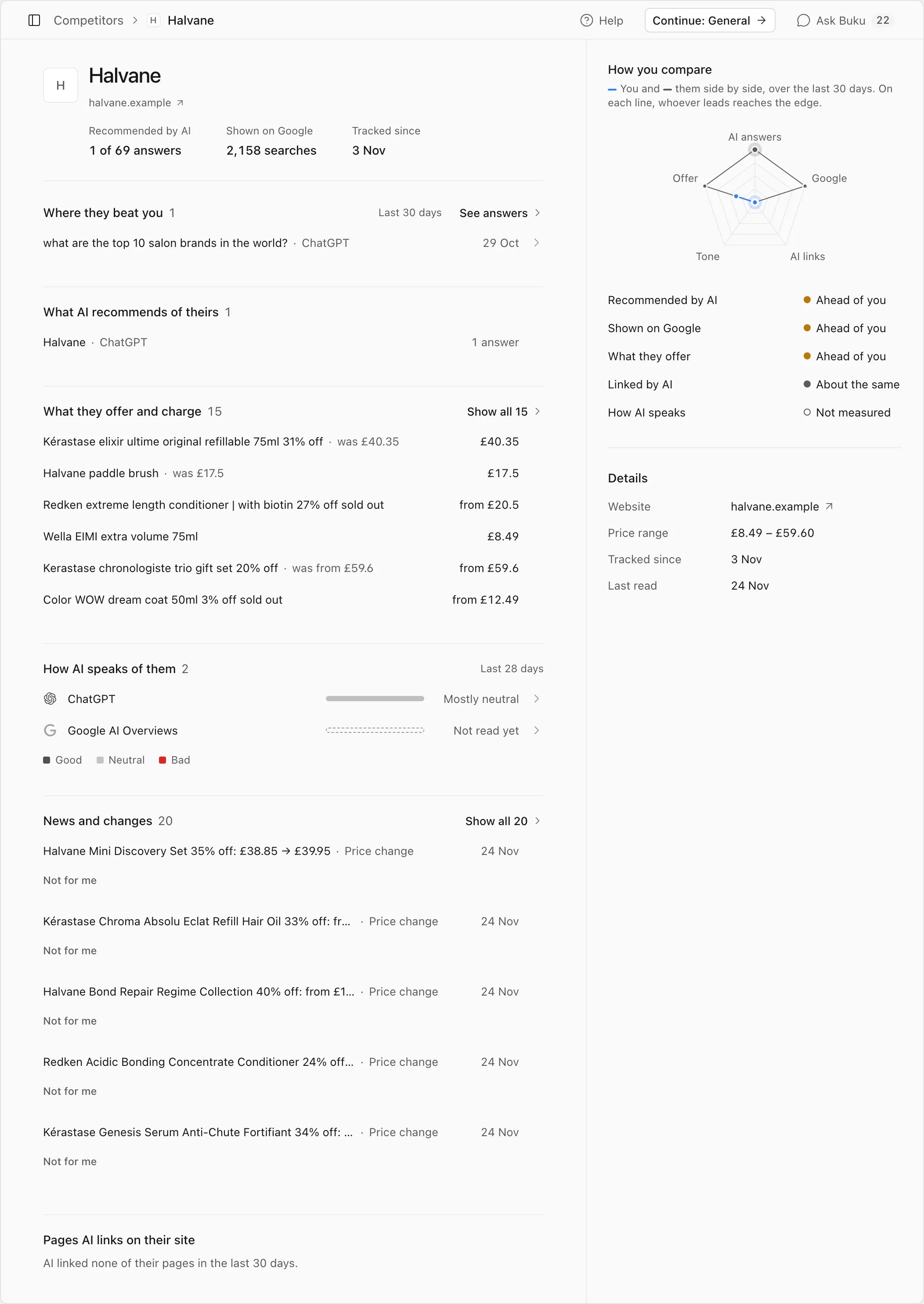
The top shows the company’s logo and name, and under the name its website. Choose the website to open their site in a new tab. While we are still reading the answers you had before this page arrived, a small grey dot sits beside the name. Rest the pointer on it, or move to it with the keyboard, and it says Still reading your earlier answers. Under that, one row gives three facts about this company, one value each:- Recommended by AI — in how many AI answers of the last 30 days AI recommended this company, for example 14 of 64 answers. When none did, it says None of 64 answers. With too few answers read, it says Not enough answers yet.
- Shown on Google — in how many of your tracked Google searches their website shows, for example 323 searches. It says None found when we looked and found none, and Not measured yet when we have not looked yet.
- Tracked since — the day you started tracking them as a competitor. Otherwise it says Not tracked, or No longer tracked for a competitor you took off your list.
How you compare
How you compare puts you and this company side by side on five areas, over the last 30 days:- Recommended by AI — answers that recommend each of you.
- Shown on Google — your tracked searches that show each of you.
- Linked by AI — answers that link to each of your websites.
- How AI speaks — the tone of what AI says about each of you, from bad to good.
- What they offer — how many products and services we know for each of you.
Details
Details lists a few plain facts:- Website — their site. Choose it to open it in a new tab.
- Price range — the lowest and highest price we read from what they offer.
- Tracked since — since when you track them. If you do not, it reads Not tracked, or No longer tracked for a competitor you took off your list (rest the pointer on it to see the date).
- Last read — when we last read about them: their own website for a competitor you track, otherwise the last time an AI answer named them.
The sections
The sections follow under the top of the page. Where they beat you always comes first. Then come the sections that hold something, and last the ones with nothing to show yet, each in one line. A row that opens something, such as answers, quotes or one of their pages, has a small arrow at its end. A section with many rows shows the first few. Its heading line then has a button such as Show all 12, with an arrow, that opens the rest in place; Show fewer folds them again.Where they beat you
Where they beat you lists the newest 5 of your buyers’ questions where AI recommended this company and not you, in the last 30 days. The heading counts the answers. Each row names the assistants that answered and the date of the newest answer. Click a row to read those answers beside the page, each with the sentence that recommends them marked; Whole answer opens one in full. See answers, on the heading line, opens every one of these answers at once, the questions not listed here too. When there are more answers than the page holds, a line under the rows says how many older ones are not listed. If you can edit the project, Respond with Buku is here when Buku can answer this company’s newest change. It opens Buku beside the page, where you choose what to answer and Buku writes it. Nothing is added to your site or sent until you choose to. It works the same way as Respond with Buku on the Competitors page.What AI recommends of theirs
What AI recommends of theirs lists each of their products or services that AI answers recommended in the last 30 days, the most recommended first. Each row names the assistants and says in how many answers. A name in quotes, marked in AI’s words, is how the AI said it. Click a row to read the answers that recommended it beside the page, as in Where they beat you: each answer names the assistant and the date, and marks the sentences that recommend it. Whole answer opens one in full. The newest 30 answers are listed; when there are more, a line under them says how many older ones recommend it too.What they offer and charge
What they offer and charge lists what they sell. Prices published on their own website come first, with the earlier price when it changed, for example was €120. Then come the things AI answers say they sell that their website did not list. A price we read somewhere other than their website says where, for example from Google Shopping. Something AI already recommends in the section above is not listed twice.How AI speaks of them
How AI speaks of them shows, for each assistant, how its answers spoke of this company in the last 30 days. We never add assistants together. Each row has a bar split into good, neutral and bad, and the tone in a word: Mostly good, Mostly neutral, Mostly bad or Mixed. Click a row to read that assistant’s quotes about them, bad ones first. When every assistant says the same, one line says so, for example Mostly neutral across Gemini, Claude and Grok, with the quotes under it.Pages AI links on their site
Pages AI links on their site lists the pages of their website that AI answers linked to in the last 30 days, the most linked first. Choose a page to open it in a new tab. The line beside the heading says how many answers this counts, for example In 1 of 41 answers with links.News and changes
News and changes lists their news, changes to their website, events and price changes, newest first. Each one says what kind of change it is, when it happened, and what it means for you. If you can edit the project, a change can have Respond with Buku, as on Competitors. Not for me hides a change for you only; Undo brings it back. When there are more changes than this page shows, it says Older changes are on Competitors. and Open Competitors takes you there.When a part has nothing to show yet
A part with nothing to show says why in one line. This is what each line means:- No AI answers read yet. — we have not read any AI answers for this part yet.
- Not enough answers yet: 3 of the 5 needed. — we have read too few answers to give a fair figure. The numbers grow with each test run.
- AI recommended nothing of theirs in the last 30 days. — we read your answers, and none recommended one of their products.
- AI never recommended them over you in the last 30 days. — no answer chose them and left you out. That is good news.
- Track them as a competitor to read this. — How AI speaks of them, By topic and News and changes are read only for the competitors you track. Choose Track as competitor to start.
- AI said nothing about them on a topic yet. — the assistants have not spoken of them well or badly yet.
- We don’t know what they offer yet. — we have not found their products or services yet.
- No news or changes saved yet. — we have not found news or a change for them yet.
- We don’t know their website. — AI named them, but we have no website for them, so there is nothing of theirs to read here.
- Not measured yet. — we have not measured this figure yet.
- AI linked none of their pages in the last 30 days. — no answer linked to their website.
- Too little known about you both to compare yet. — fewer than three areas are measured for both of you, so How you compare cannot draw a fair chart.
- Coming soon: we are still checking this reading. — we are still checking this part before we show it.
- We couldn’t read this part just now. — reading it failed this time. Open the page again later.
A competitor you took off your list
A competitor you took off your list still has its page, and old links to it still work. It is marked No longer tracked. The parts read only for tracked competitors then say Track them as a competitor to read this. Choose Track as competitor to add it back. If we cannot find the company, the page says We can’t find this company: it may have been taken off your competitors, or AI no longer recommends it in your answers. Back to Competitors takes you to your Competitors page.What to do next
- Start with Where they beat you. Read the answers to see what AI says about them that it does not say about you.
- Use Respond with Buku to answer their newest change.
- Compare What they offer and charge and What AI recommends of theirs with what you sell. If AI recommends something of theirs that you also offer, say more about yours on your website.
- If the company keeps beating you, choose Track as competitor, so it joins your Competitors page and its news is followed every week.